Audio systems
Clear speech and door release from an indoor station.

Door communication & comfort
Modern audio and video intercoms for houses, apartment buildings and businesses, with app and call-forwarding options.
Door communication & comfort
Existing wiring, number of units, door release, indoor stations and mobile use are planned together.
Clear speech and door release from an indoor station.
Camera entrance station and indoor display for better visibility.
Answer calls remotely and, depending on the system, release the door.
2-wire and IP solutions matched to the infrastructure.
Calculate price
Material prices including VAT. Installation and property-specific cabling are not included.
Additional units, indoor stations and cable routes are calculated individually.
The range covers compact doorbells, modular systems for multiple homes, entrance displays and central control panels. A complete system also needs matching indoor stations, power supplies, mounting accessories and a connection to the door release.
For a straightforward home entrance: the DS-KV6124-WBE1 combines a 4-megapixel camera with card, PIN, Bluetooth, Hik-Connect and indoor-station operation. Two lock outputs allow planning for a house door and garden gate; wiring and power are designed separately.
Hikvision lists KV8 alongside KV6, KD92 and KD94 among its TALKVU outdoor families. The exact version determines call controls, camera and access methods. A series name alone is therefore insufficient for selection.
For orientation within the range: the DS-KD9203-E6 has a 4.3-inch display; the DS-KD9403-E6 has an 8-inch touchscreen and supports card, PIN and QR access, among other methods. These documented generations do not define the features of every new TALKVU model.
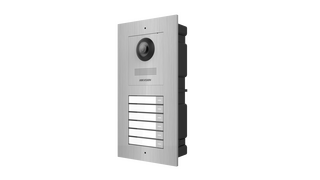
Camera modules, nameplates, call buttons, card readers and keypads are selected to suit the entrance. For multiple households we plan clear call assignments. Available wall space and the required modules determine the configuration.
An indoor monitor provides a fixed place for door communication. KC9 extends planning towards building controls: Hikvision lists lighting, blinds, climate, cameras and alarm functions for the DS-KC9570-WTE1/S. Integration with existing equipment requires individual verification.
IP systems use the data network. Two-wire solutions may suit existing cabling during renovation. We assess cable length, condition, distributors and system family on site. A kit is a starting point; additional homes, monitors and locks require compatible expansion.
The assigned indoor station signals the call. A video system lets you see and speak to the visitor and release the connected door. We plan which home or workspace should receive calls and where an additional monitor would help.
A suitable Hik-Connect configuration enables smartphone calls and door release. Supported devices, accounts, permissions and a working internet connection are required. We check which local controls remain available during an internet outage for your system.
Depending on the device, with an authorised card, PIN or smartphone Bluetooth. Residents and employees can enter while visitors ring first. Your preferred method determines device selection; a reader does not automatically accept every existing token.
Hikvision describes temporary QR and PIN credentials for supported systems, for example for a scheduled visit. The door station, firmware and management solution must all support this function.
Suitable devices and wiring make this possible to plan. Hikvision specifies two lock controls for the DS-KV6124-WBE1, for example. We check both mechanisms, power supplies and the desired separate controls. A control output does not replace an electric door release.
We first establish whether call communication is sufficient or recording is wanted. Recording, storage, access and deletion are separate planning decisions. Facial recognition is not automatically enabled or treated as an essential basic function.
For focused advice, tell us the number of homes and entrances, provide a photo of the current doorbell and describe your preferred monitors and access method. This helps us select the components you actually need.
Plan my intercomNew Hikvision solutions
Hikvision presents TALKVU as a new generation of video intercoms. During planning, we consider which controls suit your building and daily routine.
Image quality, field of view and speech clarity work together. The specific device, mounting height and entrance conditions matter.
Hikvision describes call answering and door release through Hik-Connect for TALKVU. We clarify the requirements of the chosen combination, internet connection and access permissions.
An indoor monitor can provide a central point of use. According to its manufacturer, the DS-KH9570-WTE1/S has a 10.1-inch IPS touchscreen with 1920 × 1200 resolution and Android 14.
Another newer Hikvision option is the DS-KD8005-IME1/S, a modular door-station main unit with a 5-megapixel camera and stainless-steel front. It is considered separately here; TALKVU membership is not assumed.
These devices are planning examples. German availability, compatible indoor and outdoor stations, accessories and features are checked before quotation. These newer products are not automatically included in the starter sets.
Manufacturer information: TALKVU overview · Indoor station datasheet · Modular main unit datasheet
Guides & blog
A clear network starts with a good inventory. These questions help you discuss cabling and integration of security equipment.
Read the guide →Briefly describe your project. We will structure the requirements and discuss the most useful next step.
Request a callback
Complete the short form. After checking your details, you send the callback request yourself via WhatsApp.
Request a callback
Request a callback
Please send the prepared message yourself in WhatsApp. We usually call you back within 24 hours on working days.
Opening WhatsApp transfers your details to WhatsApp/Meta. The message is only sent when you submit it in WhatsApp.